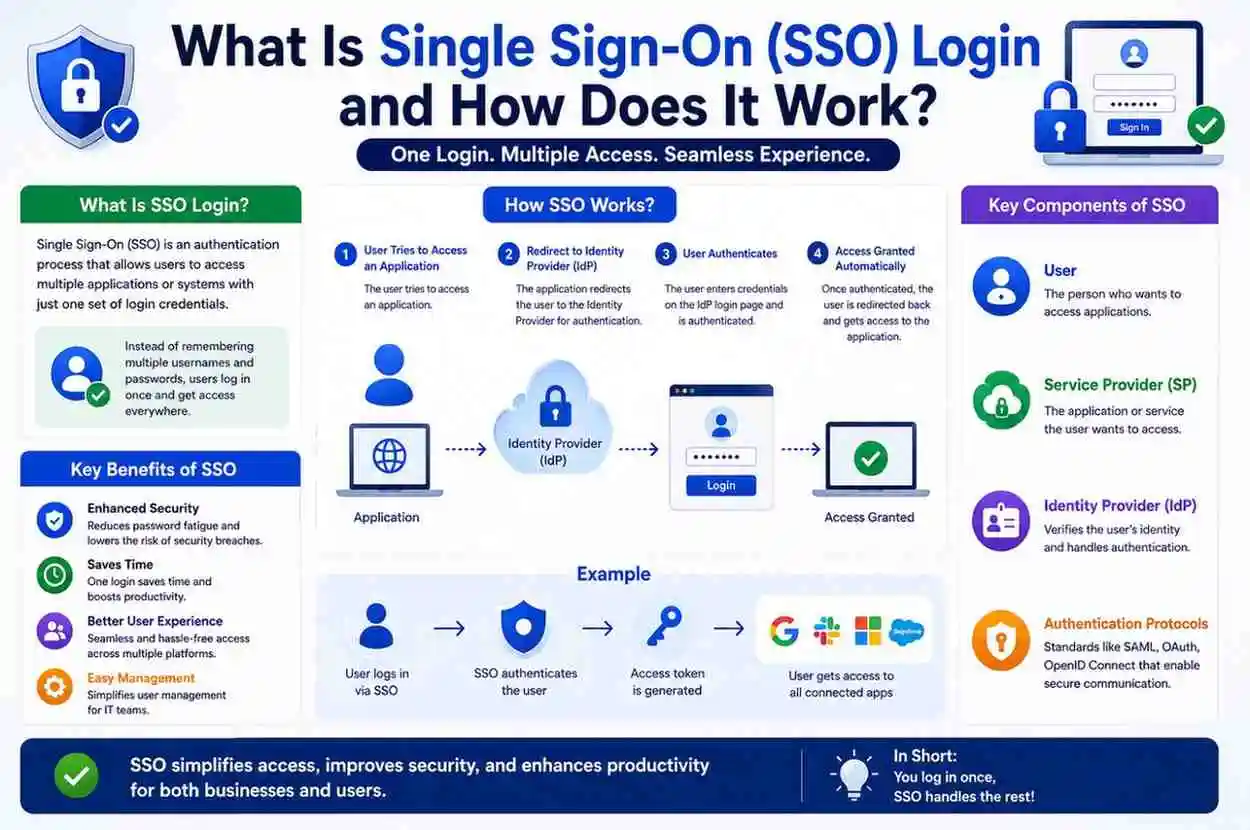
What Is Single Sign-On (SSO) Login and How Does It Work?
Managing digital access has become one of the biggest challenges in today’s connected world. Most people use multiple applications every day email platforms, cloud storage, project management tools, banking services, business software, online stores, and social accounts.
Each platform usually requires separate login credentials, which creates friction, wastes time, and increases security risks. Users forget passwords, reuse weak credentials, and spend too much time switching between accounts. For organizations, this creates even bigger problems, including support overload, inconsistent access control, and higher exposure to account compromise.
This is where Single Sign-On (SSO) changes the experience.
SSO allows users to sign in once and gain access to multiple applications without entering usernames and passwords repeatedly. Instead of maintaining dozens of credentials, users authenticate through one trusted identity system. Once verified, they can move between connected services with far less interruption.
Businesses adopt SSO to improve productivity, strengthen security, simplify user management, and create a smoother experience across connected services. It is now a core part of modern identity and access management, especially in cloud-based and hybrid work environments.
This guide explains what Single Sign-On login is, how it works, why organizations use it, and what advantages and limitations users should understand.
What Is Single Sign-On (SSO)?
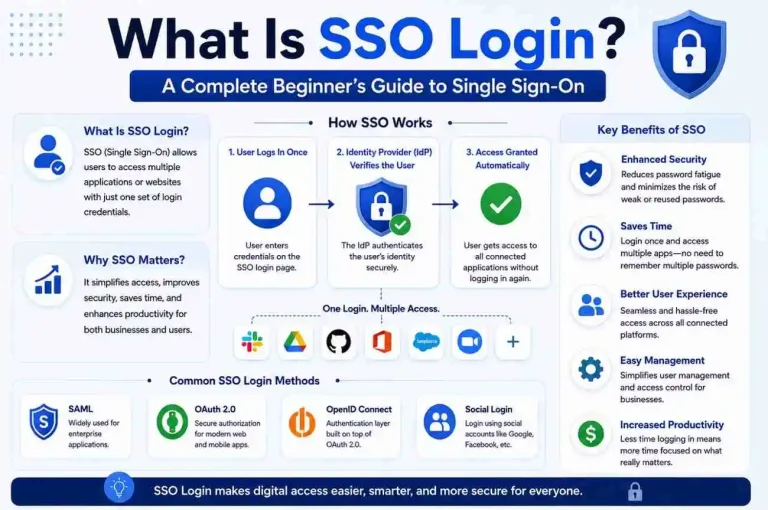
Single Sign-On (SSO) is an authentication method that enables users to access multiple applications with one set of login credentials.
Once users successfully authenticate through a central login system, connected applications recognize that authentication and grant access automatically. This means the user does not need to sign in again every time they open a new app or service within the same trusted environment.
In simple terms:
One Login → Multiple Applications
Users do not need to sign in separately to every service.
For example:
An employee logs into a company portal once and instantly gains access to:
- Corporate email
- Team communication software
- Cloud storage
- HR systems
- CRM platforms
- Internal dashboards
- Project management tools
- Knowledge base applications
Without SSO, each application would require separate credentials. That creates more password resets, more login delays, and more frustration for users who need quick access to their work tools.
SSO is especially useful in environments where people rely on many connected systems throughout the day. It reduces repetitive authentication while still allowing organizations to control access centrally.
Why Single Sign-On Matters
Modern digital environments contain dozens or even hundreds of applications. In many workplaces, employees use a different tool for communication, file sharing, payroll, analytics, customer support, and collaboration. Students may need access to learning portals, email, library systems, and exam platforms. Customers may use multiple services from the same provider.
Without SSO, users commonly experience:
- Password fatigue
- Forgotten credentials
- Repeated authentication
- Account lockouts
- Poor user experience
- Slower workflows
- More time spent on login screens than on actual tasks
Organizations experience:
- Higher support costs
- Increased security risks
- Complex access management
- More password reset requests
- Difficulty enforcing consistent policies
- Greater risk from weak or reused passwords
SSO solves these challenges by centralizing identity verification. Instead of managing access separately across every application, organizations can use one trusted identity source to authenticate users and control permissions more efficiently.
This centralization is one of the biggest reasons SSO has become so important in enterprise security and cloud access management.
How Does SSO Login Work?
To understand SSO, it helps to break the process into stages. Although the technology behind it can be complex, the user experience is usually simple and fast.
Step 1: User Requests Access
A user opens an application.
Example:
Project Management Tool
The system checks whether authentication already exists. If the user has already signed in through the trusted identity system, the app may open immediately. If not, the app begins the authentication process.
At this stage, the application does not yet know whether the user is allowed in. It only knows that access must be verified.
Step 2: Redirect to Identity Provider
If the user is not authenticated, the application redirects the request to a trusted Identity Provider (IdP).
Examples of identity providers include:
- Corporate identity systems
- Enterprise authentication services
- Central account platforms
- Cloud identity services
- Federated login systems
The identity provider becomes responsible for verification. It acts as the central authority that confirms who the user is.
This redirect is one of the most important parts of SSO. Instead of each app handling its own login independently, the app sends the user to a central system that manages identity in a secure and standardized way.
Step 3: User Authentication
The identity provider requests login credentials.
Authentication methods may include:
- Username and password
- Multi-Factor Authentication
- Biometrics
- Security keys
- One-time passcodes
- Push notifications
- Device-based verification
After verification, authentication succeeds.
If the user enters the correct credentials and passes any additional checks, the identity provider confirms the user’s identity. This is the point where trust is established.
In many modern systems, this step may also include risk-based checks such as device recognition, location analysis, or unusual login detection.
Step 4: Authentication Token Is Created
Instead of sending passwords repeatedly, the identity provider generates a secure authentication token.
This token proves identity.
The token may contain:
- User identity
- Session details
- Expiration time
- Permission information
- Application access rules
- Security claims
Applications trust this token because it comes from the identity provider. The token acts like a digital proof that the user has already been verified.
This is one of the reasons SSO is more efficient than traditional login systems. The password is not constantly reused across every application. Instead, the token carries the proof of authentication.
Step 5: Access Is Granted
Connected applications validate the token.
If valid:
Access is granted instantly.
Users continue working without additional sign-ins.
If the token is expired, invalid, or does not match the required permissions, the application may ask the user to authenticate again. Otherwise, the user can move between connected services with minimal interruption.
This seamless experience is what makes SSO so valuable in modern digital environments.
Key Components of an SSO System
Several technologies work together behind the scenes to make SSO possible.
Identity Provider (IdP)
Verifies user identity.
Responsible for:
- Authentication
- Session management
- Security policies
- Token issuance
- Login enforcement
The identity provider is the central authority in the SSO process.
Service Provider (SP)
Applications users want to access.
Examples:
- Email tools
- Cloud software
- Internal systems
- Customer portals
- Business applications
The service provider relies on the identity provider to confirm whether the user is authenticated.
Authentication Token
Secure digital proof of identity.
This token is passed between systems to show that the user has already been verified.
Session Management
Maintains user access during active sessions.
Session management determines how long a user stays signed in, when reauthentication is required, and how access is refreshed.
Access Policies
Control who can access specific resources.
These policies may depend on:
- User role
- Department
- Device type
- Location
- Security level
- Application sensitivity
Together, these components create a secure and efficient login experience.
Authentication Standards Used by SSO
SSO relies on standard protocols that allow different systems to communicate securely.
SAML (Security Assertion Markup Language)
Popular in enterprise environments.
Allows identity information exchange.
Common for:
- Corporate systems
- Enterprise software
- Internal business applications
SAML is widely used in organizations that need secure, standardized authentication across multiple platforms.
OAuth
Authorization framework commonly used for application access.
Examples include:
- Mobile apps
- Cloud services
- Third-party integrations
OAuth focuses more on authorization than identity. It helps applications request permission to access resources without exposing the user’s password.
OpenID Connect (OIDC)
Built on OAuth.
Adds identity verification.
Frequently used in modern web applications.
OIDC is popular because it combines authorization and identity in a way that works well for web, mobile, and cloud-based systems.
Types of Single Sign-On
Different environments use different SSO approaches.
Enterprise SSO
Used inside organizations.
Provides centralized employee access to internal and external business tools. This is the most common form of SSO in workplaces.
Web-Based SSO
Connects websites and cloud services.
Users can move between related online services without logging in repeatedly.
Federated SSO
Allows users to access systems across different organizations.
This is useful when two or more trusted entities share authentication responsibilities.
Social Login SSO
Allows access using existing accounts.
Examples include signing into apps using established identity platforms. This is common in consumer apps and websites because it reduces signup friction.
Example of SSO in Everyday Use
Imagine a user starts work.
They open a laptop and sign in once.
Immediately available:
- Calendar
- Cloud storage
- Team messaging
- Project tools
- HR portal
- Internal documents
No repeated authentication.
The same principle works for students and customers. A student may log into a university portal once and access course materials, grades, and library systems. A customer may sign into a service account once and use multiple connected features without logging in again.
This convenience is one of the biggest reasons SSO has become so widely adopted.
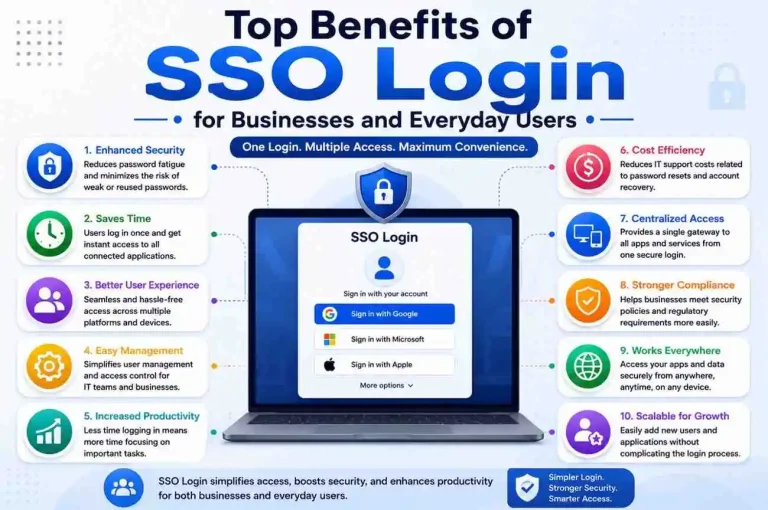
Major Benefits of SSO
Improved User Experience
Less friction.
Users work faster and spend less time dealing with login screens. This creates a smoother digital experience across devices and applications.
Reduced Password Fatigue
Fewer credentials to remember.
Users are less likely to write passwords down, reuse weak passwords, or forget login details.
Better Security
Centralized authentication.
Stronger monitoring.
When implemented correctly, SSO can improve security by reducing password exposure and making it easier to enforce strong authentication policies.
Lower IT Support Costs
Fewer password reset requests.
Help desks spend less time handling forgotten passwords and account recovery issues.
Faster Application Adoption
New software becomes easier to access.
If users can sign in with existing credentials, they are more likely to adopt new tools quickly.
Simplified User Management
Access becomes easier to control.
Administrators can add, remove, or modify access from one central system instead of managing each application separately.
How SSO Improves Security
Many people believe SSO weakens security because one login can unlock multiple systems. In reality, when implemented properly, the opposite is often true.
Security improvements include:
Centralized Authentication
Single security policy.
Organizations can enforce consistent login rules, password standards, and access controls across all connected applications.
Multi-Factor Authentication Integration
Additional verification layers.
SSO works especially well with MFA, which adds another layer of protection beyond passwords.
Reduced Credential Exposure
Passwords entered fewer times.
The fewer times users type passwords into different systems, the lower the chance of interception, phishing, or reuse across insecure platforms.
Better Monitoring
Organizations gain visibility into user activity.
Centralized login systems make it easier to detect suspicious behavior, unusual access attempts, and policy violations.
SSO vs Traditional Login Systems
| Feature | Traditional Login | SSO |
| Passwords | Multiple | Single |
| User Experience | Slower | Faster |
| Access Management | Distributed | Centralized |
| Support Requests | Higher | Lower |
| Security Monitoring | Complex | Easier |
Traditional login systems require users to authenticate separately for each application. That may work for small environments, but it becomes inefficient as the number of tools grows.
SSO simplifies the process by creating one trusted authentication path for many services.
Common Use Cases for SSO
Businesses
Employee access.
Companies use SSO to connect internal tools, cloud platforms, and business applications.
Healthcare
Protected systems.
Hospitals and clinics use SSO to help staff access patient records, scheduling tools, and administrative systems securely.
Education
Unified student portals.
Schools and universities use SSO to connect learning platforms, email, and academic resources.
Financial Services
Secure identity management.
Banks and financial institutions use SSO to streamline access while maintaining strict security controls.
E-commerce
Simplified customer login.
Online stores and digital services use SSO to reduce friction during account creation and sign-in.
Potential Challenges of SSO
Although powerful, SSO has limitations.
Central Dependency
Authentication service availability matters.
If the identity provider goes down, users may lose access to multiple connected applications at once.
Implementation Complexity
Configuration requires planning.
Setting up SSO correctly involves protocol compatibility, trust relationships, user mapping, and security policy design.
Session Security
Strong policies remain important.
If sessions are too long or poorly managed, they can create security risks.
Access Risks
Compromised credentials require immediate action.
Because one login can unlock many systems, organizations must respond quickly if an account is compromised.
Best Practices for Secure SSO Deployment
Organizations should:
- Enable MFA
- Apply strong password policies
- Monitor login activity
- Use encrypted communication
- Review permissions regularly
- Implement session timeouts
- Adopt least privilege access
- Train users on phishing awareness
- Keep identity systems updated
- Test recovery and fallback procedures
These practices help organizations get the convenience of SSO without sacrificing security.
SSO and Multi-Factor Authentication
SSO and MFA are often used together.
SSO improves convenience.
MFA strengthens verification.
Combined approach:
Single Login + Multiple Verification Layers
This creates better security without sacrificing usability.
For example, a user may sign in with a password and then confirm identity through a mobile app, security key, or biometric scan. Once verified, they can access multiple applications through the same session.
This combination is one of the most effective ways to balance convenience and protection.
The Future of Single Sign-On
Identity systems continue evolving.
Emerging trends include:
- Passwordless authentication
- Biometrics
- Adaptive authentication
- Artificial intelligence
- Behavioral analysis
- Zero Trust security
- Device trust scoring
- Risk-based access decisions
Future SSO systems are expected to become smarter, faster, and more secure. Instead of relying only on passwords, they will increasingly use contextual signals such as device health, location, behavior patterns, and real-time risk analysis.
As organizations move toward cloud-first and hybrid work models, SSO will remain a central part of identity management.
Frequently Asked Questions
Is SSO safe?
Yes, when implemented correctly with strong security controls and MFA. Like any authentication system, it must be configured and monitored properly.
Does SSO remove passwords?
Not always. It reduces how often passwords are used, but many systems still rely on passwords as part of the authentication process.
Can SSO work on mobile?
Yes. Modern SSO platforms support mobile applications, browsers, and device-based authentication flows.
Is SSO only for businesses?
No. Individuals also benefit through simplified account access, especially when using multiple connected services.
What happens if the identity provider fails?
If the identity provider is unavailable, users may not be able to access connected applications until service is restored.
Final Thoughts
Single Sign-On (SSO) is one of the most practical identity management solutions used today.
By allowing users to authenticate once and access multiple applications, SSO improves convenience, strengthens security, reduces support overhead, and creates a smoother digital experience.
Whether used in businesses, schools, healthcare systems, or everyday digital platforms, SSO continues to play an increasingly important role in secure and efficient access management.
As digital ecosystems expand, understanding how SSO works will become even more valuable for both organizations and everyday users. It is not just a convenience feature—it is a foundational part of modern authentication, access control, and identity security.