
What is SSO ID Merge? Complete Guide to Merge Rajasthan SSO IDs (2026)
SSO ID Merge is a process provided by the Rajasthan SSO Portal (sso.rajasthan.gov.in) that allows users to combine multiple SSO IDs into a single account. Many users create separate IDs using Jan Aadhaar, Bhamashah, Google, or SIPF, which can lead to confusion while accessing services.
By merging SSO IDs, you can manage all your government services, applications, and personal data under one login. This makes the system more organized, secure, and easy to use without switching between multiple accounts.
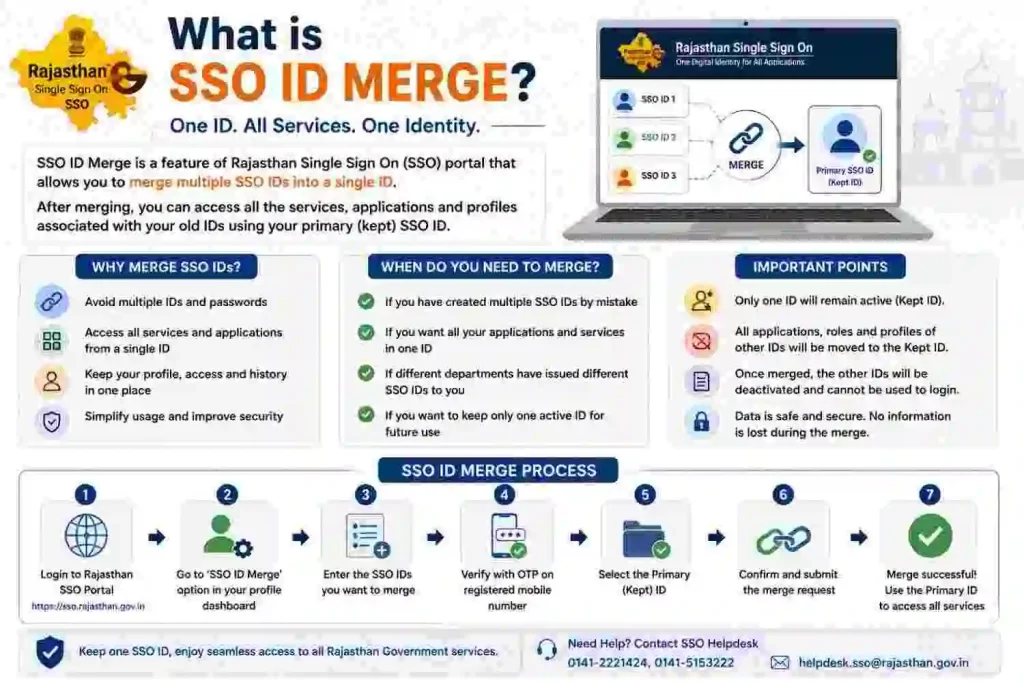
Why Should You Merge Multiple SSO IDs?
Having multiple SSO IDs can create issues like duplicate records, missed notifications, and login confusion. The SSO ID merge feature helps solve these problems by combining all accounts into one.
It also ensures that your services, like e-Mitra, GST, job applications, and government schemes, are accessible from a single dashboard. This improves efficiency and saves time.
Who Can Merge SSO IDs in Rajasthan?
The SSO ID merge option is mainly available for:

- Citizens with multiple SSO IDs
- Government employees shifting from Citizen ID to SIPF-based ID
- Users with duplicate registrations via Jan Aadhaar, Google, or Bhamashah
However, merging is subject to system validation and eligibility.
Requirements Before Merging SSO IDs
Before starting the merge process, make sure you have:
- Active SSO ID and Password
- Registered mobile number for OTP verification
- Access to both accounts (old and new)
- Correct primary SSO ID (main account)
This ensures a smooth and error-free merging process.
How To Merge SSO IDs? (Step-by-Step Process)
Merging SSO IDs lets you combine multiple accounts into one for easy access. On the SSO Rajasthan Portal, log in with your main ID, choose “Merge SSO ID,” verify both accounts, and confirm. Your data and services will be linked under a single login.
Step 1: Visit the SSO Portal Rajasthan
Go to the official website: https://sso.rajasthan.gov.in
Step 2: Log in with Your SSO ID
Enter your SSO ID (Username), Password, and Captcha, then click on Login.
Step 3: Go to Profile Settings
After logging in, open your Profile section from the dashboard.
Step 4: Click on Deactivate Account
Find and click on the “Deactivate Account” option.
Step 5: Enter Mobile Number & Verify OTP
Enter your registered mobile number and verify it using OTP.
Step 6: Enter Primary SSO ID
Provide your main (active) SSO ID where you want to merge all data.
Step 7: Confirm Merge Request
Click on “Merge Accounts” or “Allow Merge” to complete the process.
What Happens After SSO ID Merge?
Once the merge is successful:
- All services will be linked to one SSO ID
- Duplicate accounts will be deactivated
- Your application history and data will be centralized
- You can access all services from a single dashboard
This improves overall account management and user experience.
Important Instructions Before Merging SSO IDs
- Always choose the correct primary SSO ID
- Double-check your mobile number and OTP
- Some data may not transfer between accounts
- Government employee IDs (SIPF) are usually prioritized
- Once merged, the process may not be reversible
Common Errors in SSO ID Merge & Solutions
While merging IDs on the SSO Rajasthan Portal, users often hit small but fixable issues. The most common ones include mismatched details (like name or mobile number), OTP not arriving, or entering the wrong SSO ID.
The fix is simple: make sure both accounts have the same basic details, check your registered mobile/email for OTP, and double-check the ID you’re merging. If it still doesn’t work, try again after some time or update your profile details first.
OTP Not Received
Make sure your mobile number is active and has network coverage. Try resending OTP.
Invalid SSO ID Error
Check if the entered SSO ID is correct and active.
Merge Option Not Visible
This may happen if your account is not eligible for merging.
Account Not Eligible
Some accounts (especially different categories) may not support merging.
Can You Merge Citizen and Government SSO IDs?
Yes, in many cases, users can merge their Citizen SSO ID with Government (SIPF) ID. However, the final merge depends on system validation and official rules of the Rajasthan SSO Portal.
Benefits of Merging SSO IDs
- Single login for all services
- Better account management
- Avoid duplicate applications
- Easy tracking of services
- Improved security and data control
Rajasthan SSO Help Desk for Merge Issues
If you face any issues during the merge process, you can contact:
- 📞 Phone: 0141-5123717, 0141-5153222
- 📧 Email: helpdesk@rajasthan.gov.in
They provide support for SSO login, merge issues, and technical errors.
FAQs – SSO ID Merge Rajasthan
Conclusion
SSO ID Merge is a useful feature provided by the Rajasthan Government to simplify access to multiple services. By merging your SSO IDs, you can manage everything from one place, reduce confusion, and improve efficiency.
If you have multiple accounts, it is highly recommended to merge them and enjoy a smooth digital experience on the SSO Rajasthan Portal.