
Recover Your Rajasthan SSO ID Easily Online | Step-by-Step Guide (2026)
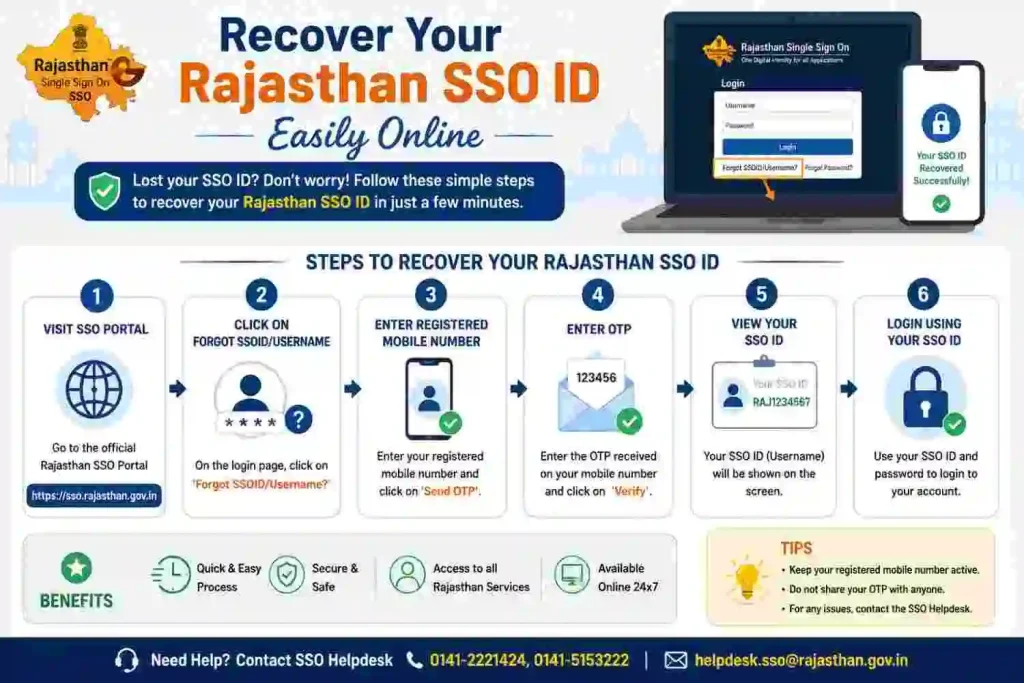
If you have forgotten your SSO ID Rajasthan, there is no need to worry. The Rajasthan Government provides a simple and secure recovery process through the SSO Portal (sso.rajasthan.gov.in). You can easily retrieve your SSO Login ID using your registered mobile number, email ID, or Jan Aadhaar details.
Recovering your SSO ID is important because it acts as your digital identity for accessing services like e-Mitra, Bhamashah, GST portal, job applications, and government schemes. Without your SSO ID, you cannot log in to the dashboard or use these services.
The recovery process is completely online, quick, and secure. By following a few simple steps, you can regain access to your account and continue using all Rajasthan government services without interruption.
Recover SSO Password
If you forgot your SSO ID password, you can reset it easily using the official SSO Rajasthan portal. The system allows password recovery through mobile number, email ID, or SMS verification, ensuring both convenience and security.
Resetting your password is necessary to regain access to your SSO dashboard, where you can manage applications, pay bills, and use various government services. The portal uses OTP-based authentication to protect your account from unauthorized access.
Always create a strong password after recovery and keep your login details safe to avoid future issues.
How to Reset SSO ID Password from Mobile?
Resetting your SSO password using your registered mobile number is one of the easiest methods. The portal sends an OTP (One-Time Password) to verify your identity before allowing password reset.

Follow these steps:
- Visit the official SSO portal: sso.rajasthan.gov.in
- Click on “Forgot Password”
- Enter your SSO ID / Username
- Choose Mobile Number as recovery option
- Enter the OTP received on your mobile
- Set a new password and confirm
This method is fast and widely used because most users have access to their registered mobile number.
Recover SSO ID Password from Email ID
If your mobile number is not accessible, you can recover your password using your registered email ID. This method is equally secure and useful for users who prefer email-based recovery.
Visit the Official Portal
Go to the official Rajasthan SSO website: https://sso.rajasthan.gov.in. This is the only trusted platform for account recovery.
Click on Forgot Password
On the login page, click on the “Forgot Password” option to start the recovery process.
Choose Email Recovery
Select Email ID as your recovery method. This will allow the system to send a reset link or verification details to your email.
Enter Registered Email Address
Enter the email ID linked with your SSO account. Make sure it is correct to avoid errors.
Submit Details
Click on Submit, then check your email inbox. Follow the instructions provided to reset your password securely.
How to Recover SSO ID Password from SMS?
Another convenient option is recovering your SSO password via SMS service. This method works even on basic mobile phones without internet access.
To recover via SMS:
- Send an SMS in the required format (as per portal instructions)
- Use your registered mobile number
- Follow the reply instructions received via SMS
- Verify your identity and reset your password
This option is especially helpful for users in rural areas or low internet connectivity zones, making SSO services more accessible across Rajasthan.