
SSO ID Registration: Complete Step-by-Step Guide for Rajasthan Portal
Getting started with an SSO ID is the key to unlocking dozens of digital services offered by the Government of Rajasthan. Through the SSO Rajasthan Portal, users can complete SSO ID registration, access SSO login, and manage services like e-Mitra, job applications, and bill payments—all from a single dashboard. Instead of juggling multiple accounts, this Single Sign-On (SSO) system brings everything under one secure login.
Whether you’re a citizen, business owner, or government employee, creating your Rajasthan SSO ID is simple and fast. With options like Aadhaar, Jan Aadhaar, and SIPF ID, the portal ensures smooth verification and quick access. Once registered, your SSO ID login Rajasthan becomes your digital identity—making it easier to access government services anytime, anywhere without repeated sign-ups.
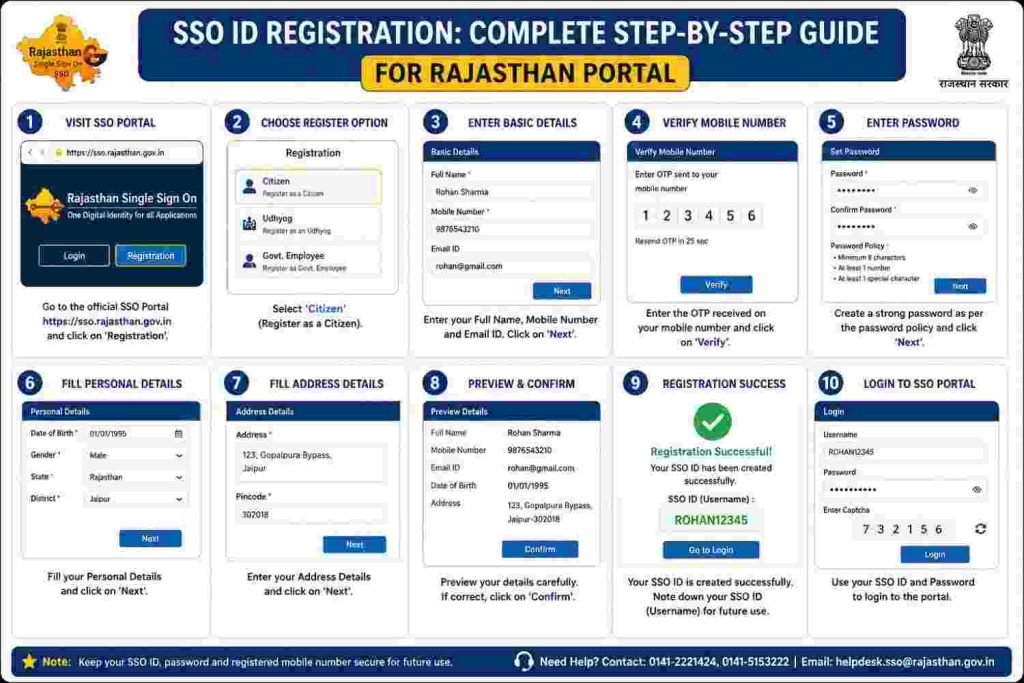
How to Register SSO ID in Rajasthan
You can register an SSO ID by selecting your user type and completing verification on the SSO Rajasthan portal.
First, I visited the official website sso.rajasthan.gov.in and clicked on the Registration option. Then, I saw three choices: Citizen, Udyog, and Government Employee, so I selected the one that matched my need.
After that, I filled in basic details like name, mobile number, and email ID. Then, I completed OTP verification and created my SSO ID login and password. Once the form was submitted, my account was ready to use.
Step-by-Step Registration Method
1. Visit the Official Portal
Head over to the SSO Rajasthan Portal and click on the “Registration” button on the homepage.

2. Choose Your User Type
Pick the category that fits you:
- Citizen
- Udhyog (Business)
- Government Employee
3. Select Registration Option
You’ll see multiple ways to register. Choose one:
- Aadhaar Card
- Jan Aadhaar ID
- Bhamashah ID
- Google Account
- Facebook Account
4. Enter Required Details
Fill in your basic info like name, ID number, and mobile number carefully—this part matters.
5. Verify with OTP
Click on “Send OTP” and enter the code sent to your mobile. This step confirms your identity.
6. Create Your SSO ID & Password
Now set your unique username (SSO ID) and a strong password you’ll actually remember.
7. Add Email & Complete Registration
Enter your email ID and hit Register. That’s it—your account is live.
SSO ID Registration for Citizens
Citizens can create an SSO ID by using Jan Aadhaar or Google and completing OTP verification on the portal.

Step-by-Step Process
- Open the official website: sso.rajasthan.gov.in
- Click on the “Registration” button on the homepage
- Select the “Citizen” option
- Choose a registration method:
- Jan Aadhaar
- Google Account
- If using Jan Aadhaar:
- Enter your Jan Aadhaar ID or enrollment number
- Click Next
- Select your name from the family member list
- Click on Send OTP and enter the received OTP
- Complete the OTP verification
- Create your SSO ID (Username)
- Set a strong password and enter your email ID
- Click on Register to complete the process
After registration, I logged into the SSO Rajasthan portal and accessed services like e-Mitra, job applications, and other government services easily.
SSO ID Registration for Government Employees
Government employees can register an SSO ID using SIPF details and OTP verification on the portal.

Step-by-Step Process
- Open the official website: sso.rajasthan.gov.in
- Click on the “Registration” option
- Select “Government Employee”
- Click on the “SIPF” option
- Enter your SIPF Number and SIPF Password
- Click on Next, and your profile details will be fetched automatically
- Verify your account using OTP sent to your registered mobile number
- Create your SSO ID (Username)
- Set a strong password
- Click on Register/Submit to complete the process
After registration, I accessed the SSO Rajasthan dashboard and used services related to department work, salary, and other government tools easily.
SSO ID Registration for Udyog (Businesses)
Business users can create an SSO ID by using BRN or GSTIN and verifying details through OTP on the portal.

Step-by-Step Process
- Open the official website: sso.rajasthan.gov.in
- Click on the “Registration” option
- Select Citizen/Udyog option (both are now combined)
- First, create a basic SSO ID using:
- Jan Aadhaar
- Google Account
- After login, add business details in your profile
- Enter your Business Registration Number (BRN) or GSTIN
- Fill in required business information
- Enter the OTP received on your registered mobile number
- Complete the verification process
- Create your Username and Password
- Click on Submit/Register
After registration, I accessed business services like GST services, licenses, and other Rajasthan government services directly from the SSO dashboard.
Helpdesk
SSO Helpdesk provides support for login, registration, and account issues.
- Helpline: 0141-5123717, 0141-5153222
- Email: helpdesk@rajasthan.gov.in
You can contact them for OTP issues, password reset, and SSO ID problems.
FAQs
Conclusion
Registering on the SSO Rajasthan Portal is one of those things that feels small but makes a big difference later. One ID, one login, and suddenly a whole range of government services opens up without the usual hassle.
Whether you’re a citizen applying for services, a business managing registrations, or a government employee handling official tasks, the system keeps everything in one place. No repeated sign-ups, no running around, just a clean, digital workflow.
Once you’re in, you’ll notice how much smoother things become. Tasks that used to take hours can now be done in minutes. And honestly, that’s the real value of SSO ID: less effort, more control, and a far more organized way to handle everyday government work.